I am writing an article on the nausea problem in VR (Virtual Reality), based on my experience.
It is a very important problem for this technology. Those who think it is the limit of THIS generation of VR technology are wrong; the problem is more complex and is not generally tied to the hardware in use.
Nausea in VR occurs when the natural sensors of the human body transmit contradictory information. Your brain thinks you are sick, and activates a safety strategy: nausea in order to vomit.
Moreover, the longer you use a VR system, the more our mind & body adapt. Personally, I have used VR prototypes for 3–4 years, and there is almost nothing left that causes me nausea.
I believe there is also something related to age. I let many friends try my VR systems (they ask me for explanations, another reason for this article). I have never found any nausea problem in boys/girls under 16, who can even play for hours. Probably a faster adaptation of their vestibular system.
We are talking about systems so advanced (finally) that they try to trick the human brain into believing it is really in a non-real environment. The comparison of VR technologies vs 3D glasses makes me shudder every time I hear it.
I summarize below the software and hardware solutions currently in use that I know. Links to game titles are YouTube trailers.
Software Solutions
- Completely avoid movement that does not happen in reality.
In most cases this requires configuring the space dedicated to the VR system called Room space.
Action in the game can take place entirely within the physical area dedicated to VR. Fantastic Contraption was practically the first title of this kind.
But it is not strictly necessary; in The Climb you can explore entire environments without any artificial movement. - Place the player in a fixed virtual environment
If the player is inside a vehicle (a car, a spaceship, a mech) motion nausea is reduced. Also because generally the peripheral vision is static (see Tunneling further below).
- Anticipate the movement trajectory
The player’s movement in the environment is predetermined. Like a ride on amusement-park cars.
Method chosen by Until Dawn Rush Of Blood, Archangel and many others.
Knowing in advance what movement is about to happen greatly reduces the negative reaction of the vestibular system. If the travel speed is high, it is advisable to show the path graphically so the brain can anticipate the movement. - Teleporting
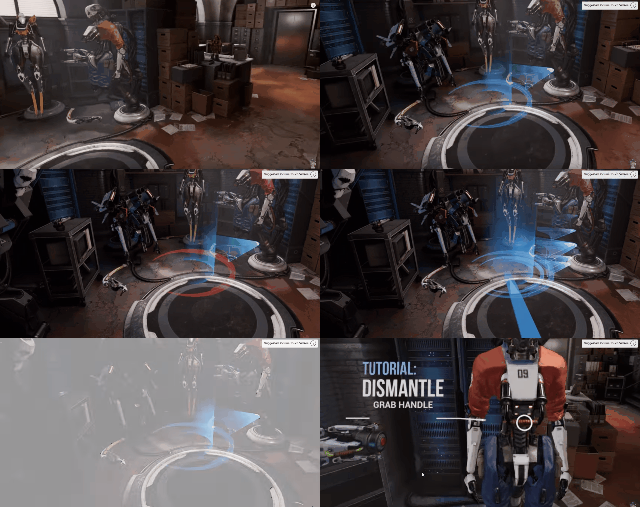
Teleporting with orientationIt is not much loved by players, because (besides being unnatural, of course) in most cases after teleporting it takes time for the player to realize the new position (typically orientation).
In Robo Recall they tried to solve this by asking the player to set the future orientation in advance.
It must also be introduced with a fade (fade in/out), which also breaks the experience.
Finally it is obviously incorrect if used to dodge enemies. - Tunnelling
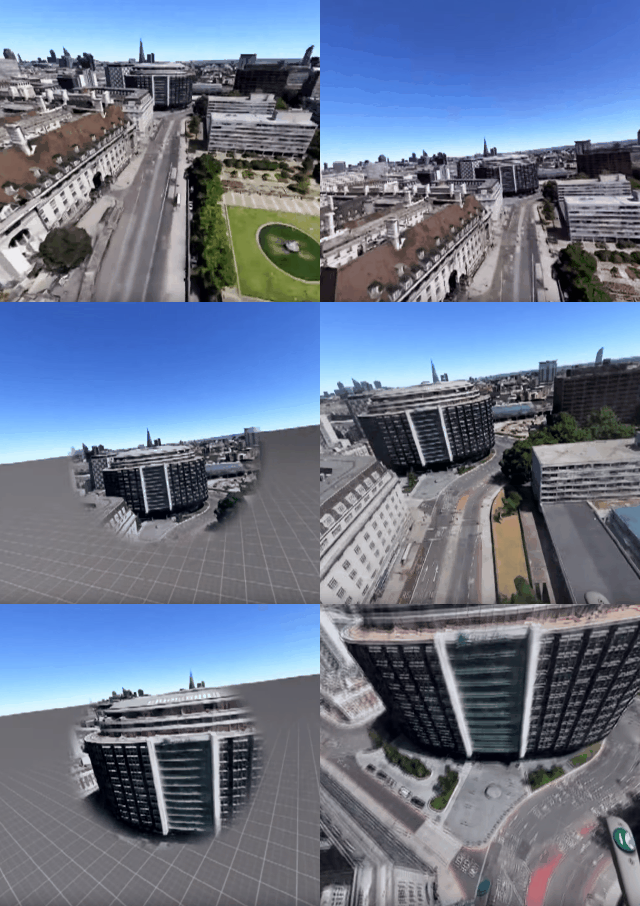
Tunneling: Comfort Mode in Google Earth VRIt consists of hiding peripheral vision during movement, also as a signal that movement is in progress.
It is the method chosen by Google Earth VR, called “Comfort Mode” (can be disabled).
- Reduce or remove accelerations to a minimum
Accelerations cause nausea. In VR it is better to switch abruptly to a crisp movement speed. - Minimize the need for manual rotation (typical Mouse Yaw, or rotation in FPS games by moving the right thumbstick horizontally). Some VR experiences are called forward-only, for example Farpoint, if conceived so as to NEVER require manual player rotation, and therefore also compatible with 180° VR environments and not only 360°.
If manual rotation is indispensable, it must happen in steps (typically 45° or 90°), and not smoothly as in any 2D game.
Best practice
If a game was born for 2D, or if it must support both 2D and VR, there are several adjustments that must be fixed or radically disabled. I mention only a few as examples.
- Often graphical elements in 2D are not real objects in the scene, but ‘overlays’ or the result of 2D post-processing. A typical example is volumetric light from windows. These elements must be corrected or removed in the VR version.
- There are player movements that are typical in 2D but must be removed in VR, for example bobbing (the fact that in 2D games while walking the head sways to increase the effect), or swaying when climbing stairs, etc.
- Blur effects, especially if simulating focus on an important moment in a scene.
If the adaptation to VR is done badly (even simply wrong shadows etc.), the brain reacts badly and triggers nausea.
It is wrong to think that any first-person game can be adapted to VR with little effort.
Hardware Solutions
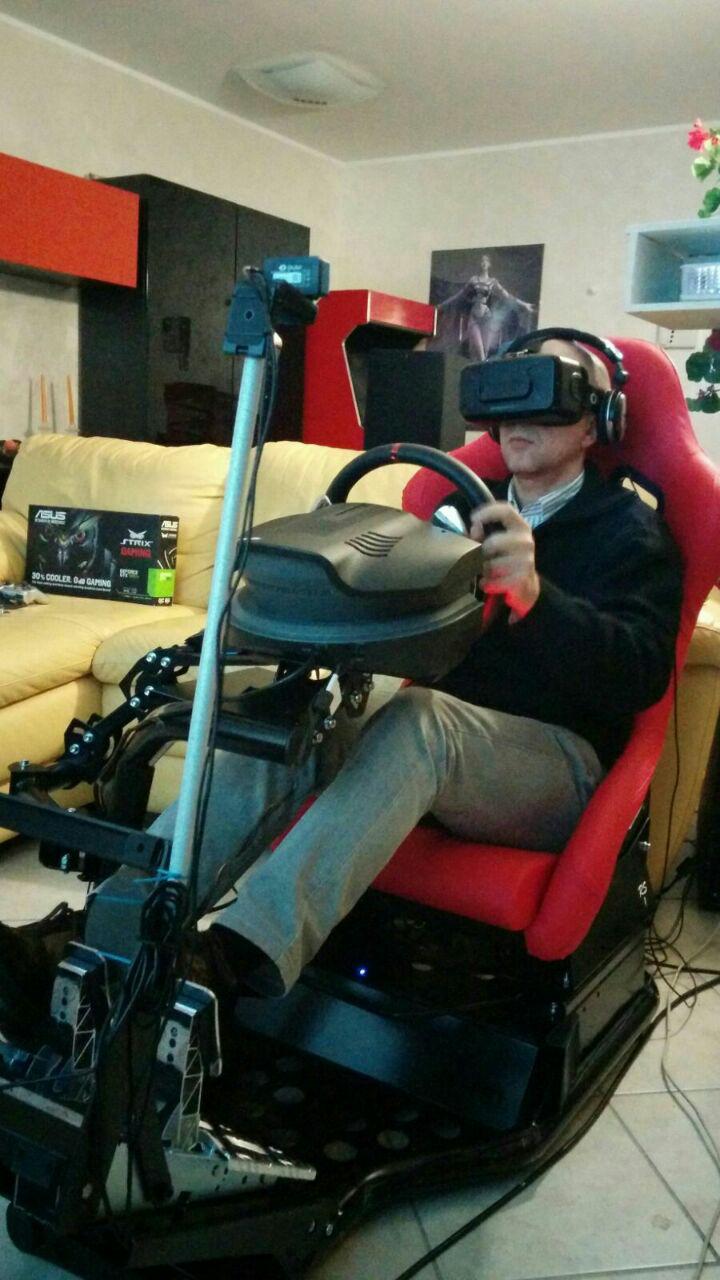
My Project Cars setup.
A posture matching
the VR experience
helps avoid
nausea
- PC: Make sure the software runs constantly at the maximum FPS (90 in the case of Oculus Rift and HTC Vive).
If the framerate drops, a ‘jerk’ in simple head movement causes nausea.
This is by far the most important precaution that EVERYONE must check/fix before using a VR system. - Headset: in theory next generations of headsets should further limit nausea, for example by introducing wider FOVs.
But this will still be relative; most of the problems are NOT tied to the headset and cannot be solved by future generations of VR hardware. - Controllers matching virtual reality: a driving rig, a real guitar in Rock Band VR, holding a rifle with Farpoint.
- There are tools that use a process called neuromodulation, electrical impulses that try to regulate gastric rhythm.
For example Reliefband. I have no idea if they work; never tried them.
Obviously, a related solution: drugs to prevent nausea. Personally I will never take a drug to play a video game. - Treadmill Simulator: Hardware to simulate movement. The most famous I believe is the Virtuix Omni.
You wear slippery shoes that bring the foot back to a central position to proceed with the next step.
https://www.youtube.com/watch?v=WDmwu5KQT7kPersonally, I have never tried any. As far as I know, there are not even AAA titles that support them natively.
Generally they do nothing more than simulate the W key of the keyboard for player movement.
For now nothing else comes to mind. I will update the article if something else occurs to me, or write to me in the comments. Ciao!